If you’re sitting on long YouTube videos, podcasts, webinars, or gameplay recordings and wondering how creators are suddenly flooding TikTok, Reels, and Shorts with perfectly timed clips…
Here’s the answer:
They’re not manually cutting everything anymore.
They’re using AI.
And in 2026, the best free AI tools to convert long videos to shorts are completely changing how content is repurposed, edited, and distributed across platforms.
Look, I’ve spent years inside editing timelines breaking long-form content into viral short-form clips, and I can tell you this honestly:
repurposing is now more powerful than original filming.
Let’s break it down like a professional VFX editor building a content pipeline.
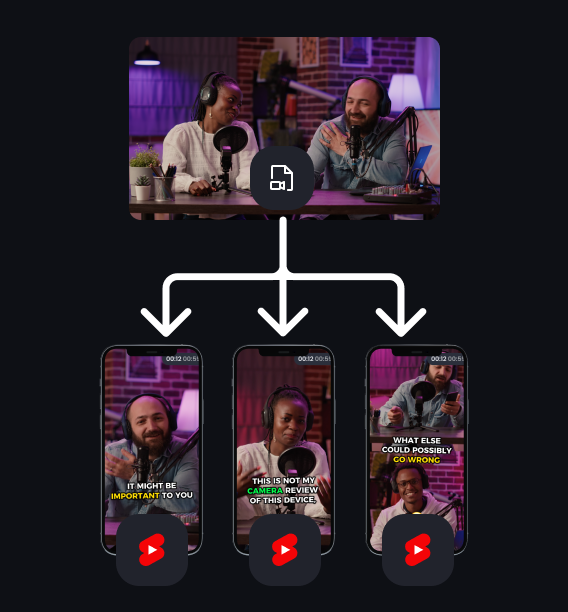
Why AI Video Repurposing Is Dominating in 2026
Short-form platforms now prioritize:
- High retention micro-clips
- Hook-based storytelling
- Emotionally dense moments
- Fast content recycling
- Multi-platform distribution
Long videos are no longer “finished content.”
They are content mines.
AI tools now extract:
- Viral moments
- Emotional peaks
- Hook-worthy sentences
- Action-heavy sequences
- Engagement spikes
This is why creators can post 10–30 shorts from a single long video.
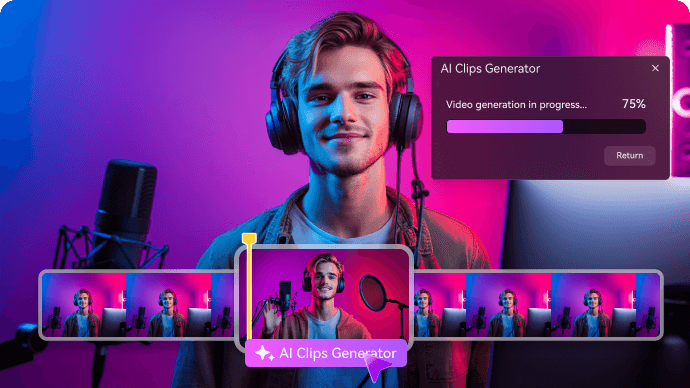
Best Free AI Tools to Convert Long Videos to Shorts (2026 Stack)
Modern creators use a hybrid AI workflow instead of one tool.
Here’s the professional stack:
- CapCut → Auto-cut shorts + captions + templates
- Runway ML → Smart scene detection + AI clipping
- Sora → AI-enhanced storytelling + scene recreation
- YouTube Studio AI → Basic highlight detection
- Descript-style tools → Text-based video editing
But the real power comes from combining AI clipping + human refinement.
CapCut vs Runway vs Traditional Editing (Short Conversion Workflow)
| Feature | CapCut AI | Runway ML | Manual Editing |
|---|---|---|---|
| Auto Clip Detection | Strong | Advanced | None |
| Hook Detection | AI-based | Context-aware | Manual |
| Speed | Extremely fast | Fast | Slow |
| Editing Control | Medium | High | Very high |
| Best For | Beginners & creators | Pro AI workflows | Film editors |
For 90% of creators, CapCut alone is enough.
How AI Converts Long Videos into Viral Shorts
Before the steps, understand the AI logic:
AI scans long videos using:
- Speech recognition
- Emotion detection
- Scene change tracking
- Engagement prediction
- Keyword spotting
Then it identifies:
- Viral hooks
- Emotional spikes
- Story turning points
- Visual highlights
This is why AI tools can cut 1-hour videos into 10–20 shorts automatically.
Step-by-Step: Using AI Tools to Convert Long Videos into Shorts
Now let’s build a real professional workflow.
Step 1: Import Long-Form Video
Open CapCut and import your:
- Podcast
- YouTube video
- Gameplay session
- Webinar or tutorial
Best practice:
- Use high audio clarity
- Ensure speaker is visible if possible
- Avoid excessive background noise
Here is the real talk about high-retention editing: AI performs best when input quality is clean.
Step 2: Use AI Auto-Cut Feature
Go to:
AI Tools → “Auto Cut” or “Smart Highlights”
CapCut will:
- Scan speech patterns
- Detect emotional spikes
- Identify engaging moments
- Split content into short segments
Each segment is potential viral content.
Step 3: Select High-Retention Moments
Not all AI cuts are equal.
Choose clips that contain:
- Strong hook lines
- Emotional reactions
- Unexpected statements
- Story turning points
Avoid:
- Long explanations
- Slow intros
- Repetitive dialogue
Retention is everything.
Step 4: Refine Clips Using AI Assistant
Now enhance selected clips:
- Auto captions
- Keyword highlighting
- Smart zoom on speaker face
- AI noise reduction
You can also pass clips into Runway ML for advanced segmentation or cleanup.
Step 5: Add Viral Short Structure
Every short must follow this structure:
- Hook (0–2 sec)
- Context (2–5 sec)
- Value (5–20 sec)
- Payoff (final seconds)
- Loop ending
AI tools often detect structure automatically, but manual adjustment improves performance.
Step 6: Add Captions for Retention Boost
Captions increase retention by 40–60%.
Use:
- Bold keywords
- Highlighted emotional words
- Dynamic text animation
- Sync with speech rhythm
Modern CapCut AI auto-generates captions with timing accuracy.
Step 7: Reframe for Vertical Shorts (9:16)
Convert long horizontal videos into vertical format:
- Auto crop subject tracking
- Face-centered framing
- Motion follow mode
- Zoom-based repositioning
This is essential for TikTok, Reels, and Shorts.
Step 8: Enhance with AI Visual Upgrades (2026 Trick)
Now apply AI enhancements:
- Background blur
- Motion stabilization
- Color correction
- Sharpness boost
If needed, use Sora for cinematic reimagining of scenes or transitions.
Step 9: Export Multiple Variations
Do not export only one version.
Instead:
- Create 3–5 variations per clip
- Change hook text
- Adjust pacing slightly
- Test different captions
This is how viral creators scale content.
AI Settings Checklist for Viral Shorts (2026 Standard)
Before exporting:
- ✔ Hook appears within first 2 seconds
- ✔ Clip duration under 60 seconds
- ✔ Captions are synced and readable
- ✔ Subject is properly centered
- ✔ No dead audio space
- ✔ Color grading is consistent
- ✔ Motion is smooth and intentional
Common Mistakes Beginners Make
Mistake 1: Trusting AI Without Editing
AI clips are raw material, not final edits.
Mistake 2: Keeping Weak Hooks
First 2 seconds decide performance.
Mistake 3: Ignoring Audio Quality
Bad audio kills retention instantly.
Mistake 4: Overloading Effects
Too many transitions reduce clarity.
Even small mistakes reduce viral potential.
Why AI Repurposing Is So Powerful in 2026
AI has evolved from simple cutting tools into:
- Semantic understanding systems
- Emotion recognition engines
- Engagement prediction models
- Narrative segmentation tools
This means long videos are no longer static content—they are data-rich storytelling libraries.
And AI is the extractor.
Where vfxcut.xyz Comes In
At vfxcut.xyz, we break down real-world workflows used by viral editors and content engineers.
You’ll learn:
- AI-driven editing pipelines
- Short-form retention strategies
- Viral scripting and pacing systems
- Professional VFX workflows for creators
This is where raw footage becomes engineered content.
Final Thoughts
Learning the best free AI tools to convert long videos to shorts is not just about automation.
It’s about content multiplication.
When used correctly, AI helps you:
- Turn 1 video into 10–30 shorts
- Extract viral moments automatically
- Scale content across platforms
- Increase output without increasing workload
But here’s the key truth most creators miss:
AI finds moments. You define meaning.
CTA
Now it’s your turn.
Take one long video, run it through AI tools, and start identifying viral moments you never noticed before.
Then explore more advanced AI workflows, short-form editing systems, and viral growth strategies on vfxcut.xyz, your ultimate hub for short-form creators and VFX enthusiasts.
Start turning long content into viral short-form dominance today.