If you’ve ever watched a cinematic YouTube video or a viral Reel and thought, “Where did they even get that b-roll?”, here’s the truth:
A huge percentage of it is no longer filmed.
It’s generated.
And in 2026, learning how to use Runway Gen-2 for cinematic b-roll has become one of the most powerful skills for modern content creators, editors, and VFX artists.
Look, I’ve spent over a decade working with traditional footage, stock libraries, and now AI-generated visuals—and I can tell you this honestly:
AI b-roll is not replacing filmmaking… it’s accelerating it.
Let’s break it down like a real production pipeline used in modern short-form storytelling.
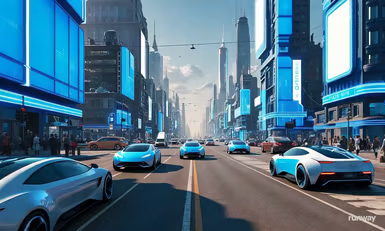
Why AI-Generated B-Roll Is Dominating in 2026
Short-form platforms now prioritize:
- Fast visual storytelling
- High cinematic density
- Emotion-driven transitions
- Zero dead space in edits
- Unique visuals that stand out instantly
Traditional stock footage often feels repetitive.
AI b-roll fixes this by generating:
- Custom cinematic environments
- Dynamic camera movement
- Impossible real-world shots
- Stylized storytelling visuals
- Fully controlled atmosphere scenes
That’s why creators now rely heavily on tools like Runway ML.
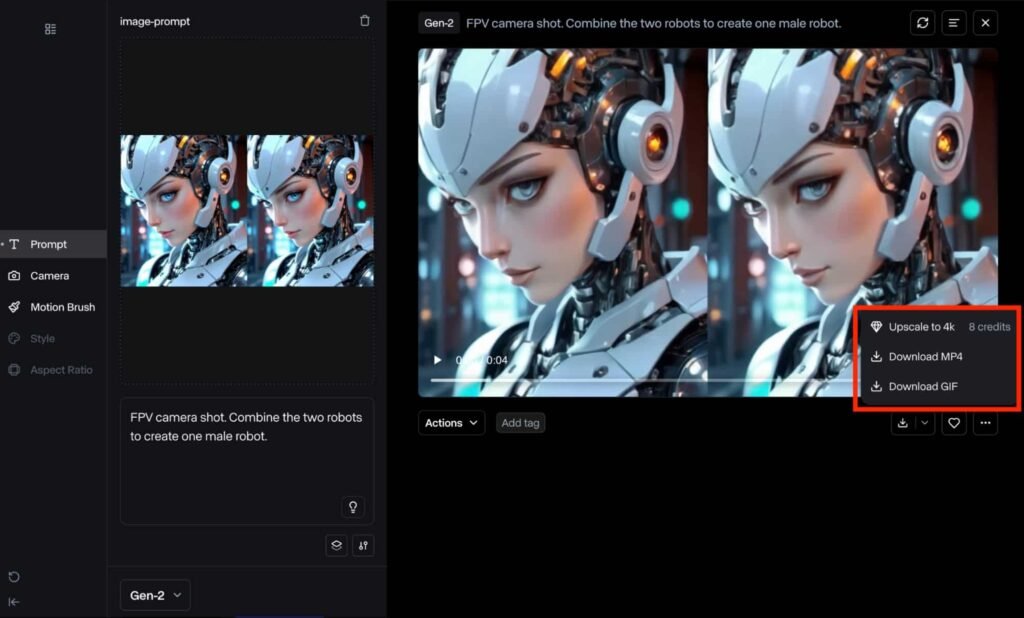
What is Runway Gen-2 in Modern AI Editing Workflow
Runway Gen-2 is an AI video generation system that creates:
- Cinematic motion clips from text prompts
- Stylized video environments
- Controlled camera movement sequences
- Scene-based visual storytelling
Instead of searching stock libraries, you describe the shot.
Example:
“A cinematic drone shot over a neon cyberpunk city at night, slow motion, rain reflections, shallow depth of field.”
And the AI generates it.
Runway Gen-2 vs Traditional Stock Footage Workflow
| Feature | Runway Gen-2 | Stock Footage |
|---|---|---|
| Customization | Fully AI-generated | Limited library |
| Cost | Free + paid tiers | Often paid per clip |
| Uniqueness | High | Low (reused clips) |
| Speed | Instant generation | Search + download |
| Creative Control | Full prompt control | Restricted |
For cinematic storytelling, AI clearly wins.
How to Use Runway Gen-2 for Cinematic B-Roll (Step-by-Step Guide)
Now let’s build a real workflow used by professional creators.
Step 1: Define Your Cinematic Intent
Before opening Runway ML, decide:
- Mood (cinematic, dramatic, futuristic, emotional)
- Environment (city, nature, abstract, indoor)
- Camera style (drone, handheld, dolly, slow zoom)
- Time of day (golden hour, night, neon, foggy)
Here is the real talk about high-retention editing: AI output depends 100% on your creative direction.
Step 2: Write High-Precision AI Prompts
Your prompt is your director’s instruction.
Bad prompt:
“City at night”
Good prompt:
“Ultra cinematic aerial drone shot of a futuristic city at night, neon reflections on wet streets, slow camera movement, 4K film grain, shallow depth of field, moody lighting”
The difference is retention-quality output.
Step 3: Generate Multiple Variations
Never settle for one output.
Generate:
- Wide establishing shots
- Close-up motion shots
- Atmospheric transition clips
- Abstract cinematic inserts
This gives your edit visual rhythm.
Step 4: Select High-Impact Clips for Storytelling
Choose clips based on:
- Motion clarity
- Lighting depth
- Emotional tone
- Camera movement quality
- Scene uniqueness
Avoid flat or static outputs.
Step 5: Import into Your Editing Timeline
Bring generated clips into your editor:
- CapCut (mobile workflow)
OR - Adobe Premiere Pro (pro workflow)
Now your AI b-roll becomes part of a structured narrative.
Step 6: Match B-Roll with Story Beats
Cinematic b-roll is not random.
You must align visuals with:
- Voiceover pacing
- Emotional peaks
- Script transitions
- Music rhythm
Example:
- Emotional line → slow cinematic rain scene
- Strong statement → fast drone motion shot
- Transition → abstract AI-generated visuals
This is where storytelling becomes powerful.
Step 7: Add Camera Motion Enhancement
Even AI-generated clips benefit from post motion control:
- Slow zoom in/out
- Slight horizontal pan
- Digital stabilization
- Motion blur during transitions
This creates a “filmed reality” illusion.
Step 8: Color Grade for Cinematic Consistency
AI outputs vary in tone.
Apply:
- Filmic contrast curve
- Teal & orange balance (optional cinematic style)
- Shadow depth enhancement
- Highlight softening
- Grain overlay for realism
Without grading, AI footage feels disconnected.
Step 9: Blend AI B-Roll with Real Footage
The best creators combine:
- AI-generated b-roll
- Real smartphone footage
- Stock overlays
- Motion graphics
This hybrid workflow increases realism and engagement.
Step 10: Export for Short-Form Platforms
Recommended settings:
- Resolution: 1080×1920 (vertical)
- FPS: 30 or 60 depending on motion
- Bitrate: High (15–25 Mbps)
- Format: MP4 (H.264)
Proper export ensures AI detail is preserved.
Cinematic Prompt Settings Checklist (2026 Standard)
Before generating AI b-roll, ensure:
- ✔ Clear visual subject defined
- ✔ Camera movement specified
- ✔ Lighting environment included
- ✔ Mood or emotion described
- ✔ Time of day defined
- ✔ Depth of field mentioned
- ✔ Style reference included (cinematic, film, etc.)
Common Mistakes Beginners Make
Mistake 1: Weak Prompts
Vague prompts create unusable footage.
Mistake 2: No Story Context
Random AI clips don’t build emotional engagement.
Mistake 3: Ignoring Color Consistency
Mismatch breaks cinematic illusion.
Mistake 4: Overusing AI Effects
Too much artificial enhancement reduces realism.
Even powerful AI tools fail without creative direction.
Why Runway Gen-2 Is a Game Changer in 2026
AI video generation now understands:
- Motion physics
- Scene composition
- Lighting simulation
- Camera behavior
- Cinematic language patterns
This means creators can generate professional-grade b-roll without filming expensive setups.
But here’s the truth:
AI doesn’t replace directors—it replaces limitations.
Where vfxcut.xyz Comes In
At vfxcut.xyz, we break down real-world AI filmmaking workflows used by viral creators and professional editors.
You’ll learn:
- AI b-roll generation systems
- Short-form cinematic storytelling
- Advanced color grading techniques
- High-retention editing strategies
This is where creators evolve into visual storytellers.
Final Thoughts
Learning how to use Runway Gen-2 for cinematic b-roll is not just a technical skill—it’s a creative shift.
You are no longer dependent on:
- Locations
- Equipment
- Stock libraries
Instead, you control:
- Mood
- Environment
- Camera movement
- Storytelling structure
But here’s the key truth most creators miss:
AI creates visuals. You create meaning.
CTA
Now it’s your turn.
Start experimenting with AI prompts, generate cinematic b-roll, and build your own visual storytelling system using Runway Gen-2.
Then explore more advanced AI editing workflows, VFX breakdowns, and viral short-form strategies on vfxcut.xyz, your ultimate hub for short-form creators and VFX enthusiasts.
Go create visuals that don’t just look cinematic—but feel like a film.